


Web scraping with Node, Axios and Cheerio
- Authors
- Name
- Hamza Rahman
- Published on
- -11 mins read-



Introduction
Web scraping is a way to pull data out of a website: text, links, images, or any other content that is in the page. In this tutorial we scrape a static, server-rendered site. That means the HTML already contains the data when it arrives, so we do not need a real browser to run JavaScript. For sites that render with React or Angular on the client, see the Cheerio vs Puppeteer note near the end.
We will scrape stories from Hacker News and save the ones that match a list of keywords to a CSV file. The code is configurable, so you can change the keywords and how far back to look without editing the logic.
The two tools doing the work are Axios and Cheerio. Axios fetches the page HTML over HTTP. Cheerio parses that HTML and gives us a jQuery-style API to select the parts we want. We then handle pagination and write everything to a CSV file with the built-in fs module.
Project setup
Create a new directory for the project:
mkdir web-scraping-tutorialcd web-scraping-tutorialAssuming Node.js and npm are installed, initialize the project:
npm init -yInstall the dependencies:
npm i axios cheerio dotenvRequesting the website HTML with Axios
We use Axios to visit the URL and get the HTML back. Create request.js:
const axios = require('axios')
const requestURL = async (url) => {  try {    const response = await axios.get(url, {      headers: { 'User-Agent': 'Mozilla/5.0 (scraping-tutorial)' },    })    return response.data  } catch (error) {    console.error('Request failed:', error.message)  }}
module.exports = requestURL
We set a User-Agent header because some sites reject requests that do not look like a browser. The function takes a URL and returns the raw HTML string from response.data.
Configuration with an env file
An .env file lets us change settings without touching the code. Note that env values are strings, so the array below is JSON that we parse back into an array later.
URL="https://news.ycombinator.com/"FILTER_VALUES=["javascript", "node", "rust", "ai"]MAX_DAYS_BACK=2URL is the page to scrape. FILTER_VALUES are the keywords we care about: a story is flagged when its title contains any of them. MAX_DAYS_BACK controls how old a story can be before we stop.
Handler to control the flow
Create handler.js to drive the app:
require('dotenv').config()const request = require('./request')
let { URL, FILTER_VALUES: filterValues, MAX_DAYS_BACK: maxDaysBack } = process.envfilterValues = JSON.parse(filterValues) // string to arraymaxDaysBack = Number(maxDaysBack)
const scrapePage = async (url) => {  const siteHTML = await request(url)  console.log(siteHTML)  // parse the HTML, filter it, save to CSV, then follow pagination}
scrapePage(URL)
Now that Axios has the HTML, we pass it to Cheerio.
Parsing the HTML with Cheerio
Cheerio loads an HTML string and returns a $ function that works like jQuery. You select elements with CSS selectors and read their text or attributes.
Create processHTML.js:
const cheerio = require('cheerio')
const processHTML = (html) => {  const $ = cheerio.load(html)  const data = []  let nextPage = ''  // selectors go here}
module.exports = processHTML
Finding the right CSS selectors
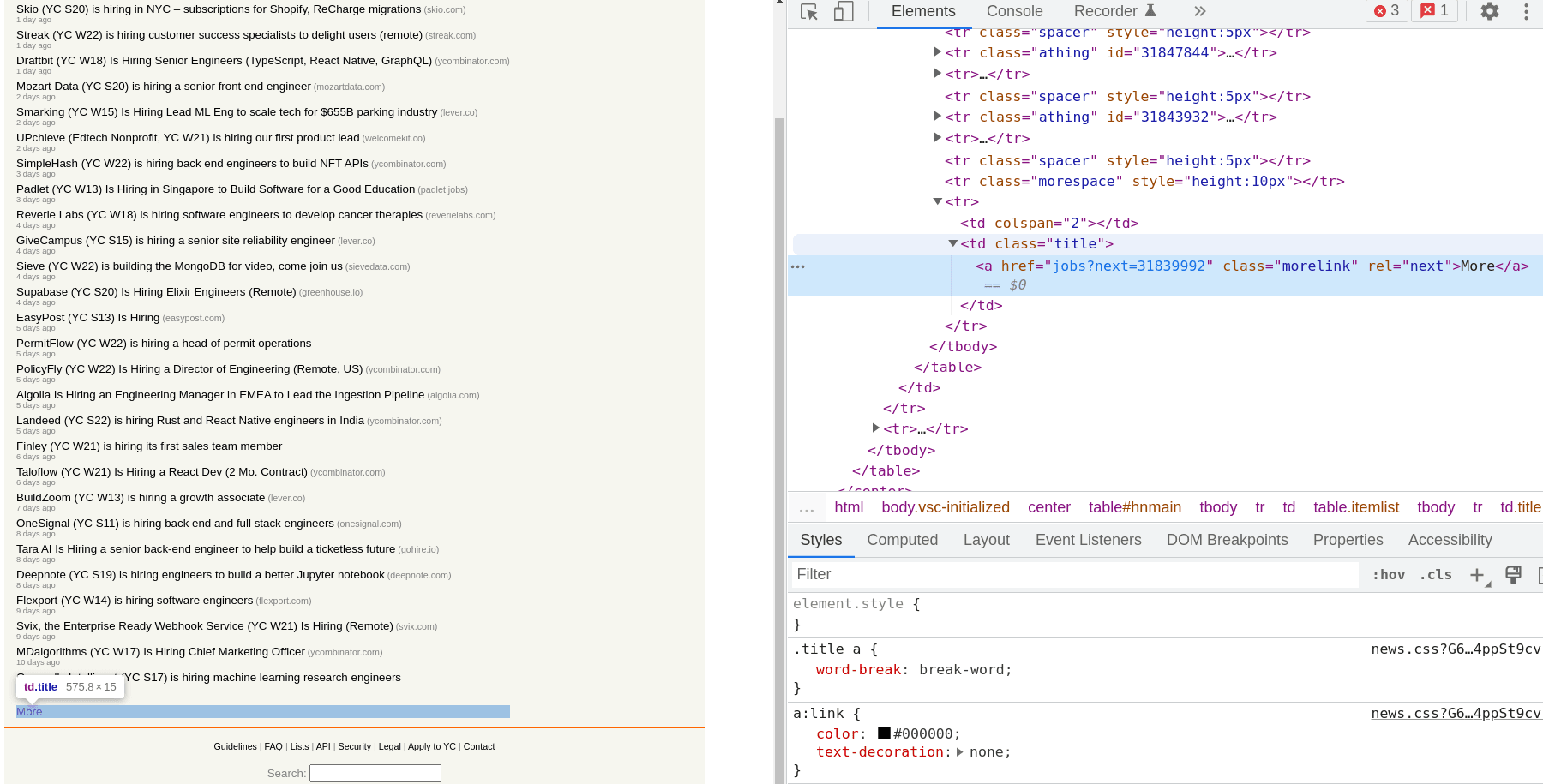
Open the page in your browser, right click an item, and choose Inspect. That shows you the element and its classes. On the Hacker News front page each story is a table row with the class athing, the title and link live in a titleline span, the timestamp is in an age span on the next row, and the "More" link at the bottom carries the class morelink.

Next page URL
The "More" link takes us to the next page. Its href is relative (?p=2), so we join it to the base URL:
nextPage = 'https://news.ycombinator.com/' + $('.morelink').attr('href')$('.morelink') selects the element by class, and .attr('href') reads its href attribute.
Title and link
Titles repeat for every story, so we loop with .each over the athing rows and, inside each one, .find the link in the titleline span.

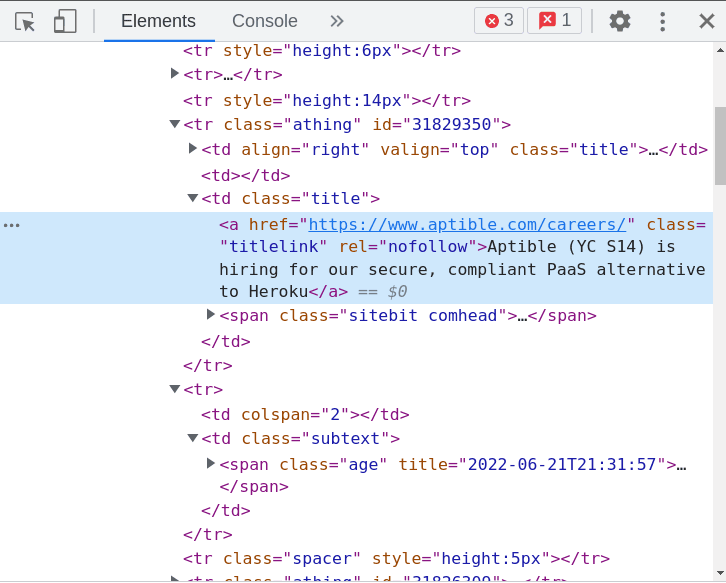
$('.athing').each((index, element) => { const title = $(element).find('.titleline > a').text() const link = $(element).find('.titleline > a').attr('href')}).each walks every matched element. Inside the callback, $(element) wraps the current row so we can .find elements within it. .text() returns the text content, and .attr('href') returns the link target.
Time posted
The timestamp is not inside athing. It sits in the next sibling row, in a span with the class age. That span has a title attribute holding a precise ISO date, which is far easier to work with than the "2 hours ago" text.
const ageTitle = $(element).next().find('.age').attr('title')// e.g. "2026-06-26T05:40:36 1782452436"const postedISO = ageTitle ? ageTitle.split(' ')[0] : null.next() moves to the next sibling element, where we .find the age span and read its title. We keep just the ISO date part before the space.
Filtering the data
First, check whether the title contains any keyword. Lowercasing both sides avoids missing matches on capitalization.
const titleLower = title.toLowerCase()const hasFilterItem = filterValues.some((item) => titleLower.includes(item))The .some() array method returns true if any keyword is found in the title. (For the inverse check, see how to check if a string contains an array element.)
Next, work out how many days old the story is from the ISO date:
const daysAgo = postedISO ? (Date.now() - new Date(postedISO).getTime()) / (1000 * 60 * 60 * 24) : InfinitySaving the matched rows
Push each story that is recent enough into the data array. Once a page is older than maxDaysBack, there is no point following pagination further, so we clear nextPage.
if (daysAgo <= maxDaysBack) { data.push({ link, title, postedISO, hasFilterItem })} else { nextPage = null}Here we save every recent story and keep hasFilterItem as a column. To save only the matching stories instead, add the flag to the condition:
if (daysAgo <= maxDaysBack && hasFilterItem) { data.push({ link, title, postedISO, hasFilterItem })}The complete processHTML.js:
const cheerio = require('cheerio')
const processHTML = (html, filterValues, maxDaysBack) => {  const $ = cheerio.load(html)  const data = []  let nextPage = 'https://news.ycombinator.com/' + $('.morelink').attr('href')
  $('.athing').each((index, element) => {    const title = $(element).find('.titleline > a').text()    const link = $(element).find('.titleline > a').attr('href')
    const ageTitle = $(element).next().find('.age').attr('title')    const postedISO = ageTitle ? ageTitle.split(' ')[0] : null
    const titleLower = title.toLowerCase()    const hasFilterItem = filterValues.some((item) => titleLower.includes(item))
    const daysAgo = postedISO      ? (Date.now() - new Date(postedISO).getTime()) / (1000 * 60 * 60 * 24)      : Infinity
    if (daysAgo <= maxDaysBack) {      data.push({ link, title, postedISO, hasFilterItem })    } else {      nextPage = null    }  })
  return { data, nextPage }}
module.exports = processHTML
Call it from handler.js:
const processHTML = require('./processHTML')
const { data, nextPage } = processHTML(siteHTML, filterValues, maxDaysBack)console.log(data, nextPage)
Writing the data to a CSV file
You do not need an extra library for CSV. A small helper escapes any value that contains a comma, quote, or newline, which keeps the file valid.
const fs = require('fs')
const toCsvRow = (values) =>  values    .map((value) => {      const cell = String(value ?? '')      return /[",\n]/.test(cell) ? `"${cell.replace(/"/g, '""')}"` : cell    })    .join(',')
Create a uniquely named file with the current date and time, and write the header row once before any data:
const fileName = `${new Date().toISOString().replace(/[:.]/g, '-')}-hackerNews.csv`fs.writeFileSync(fileName, toCsvRow(['Link', 'Title', 'Posted', 'Matched']) + '\n')Then append each story:
for (const row of data) { fs.appendFileSync( fileName, toCsvRow([row.link, row.title, row.postedISO, row.hasFilterItem]) + '\n' )}Handling pagination
To scrape the next page, visit nextPage and repeat. This recurses until nextPage is null, which happens once a page is older than maxDaysBack.
if (nextPage) { scrapePage(nextPage)} else { console.log('Finished!')}Complete handler.js
require('dotenv').config()const fs = require('fs')const request = require('./request')const processHTML = require('./processHTML')
let { URL, FILTER_VALUES: filterValues, MAX_DAYS_BACK: maxDaysBack } = process.envfilterValues = JSON.parse(filterValues)maxDaysBack = Number(maxDaysBack)
const toCsvRow = (values) =>  values    .map((value) => {      const cell = String(value ?? '')      return /[",\n]/.test(cell) ? `"${cell.replace(/"/g, '""')}"` : cell    })    .join(',')
const fileName = `${new Date().toISOString().replace(/[:.]/g, '-')}-hackerNews.csv`fs.writeFileSync(fileName, toCsvRow(['Link', 'Title', 'Posted', 'Matched']) + '\n')
const scrapePage = async (url) => {  const siteHTML = await request(url)  const { data, nextPage } = processHTML(siteHTML, filterValues, maxDaysBack)
  for (const row of data) {    fs.appendFileSync(      fileName,      toCsvRow([row.link, row.title, row.postedISO, row.hasFilterItem]) + '\n'    )  }
  console.log(`${data.length} stories saved`)
  if (nextPage) {    scrapePage(nextPage)  } else {    console.log('Finished!')  }}
scrapePage(URL)
Run it:
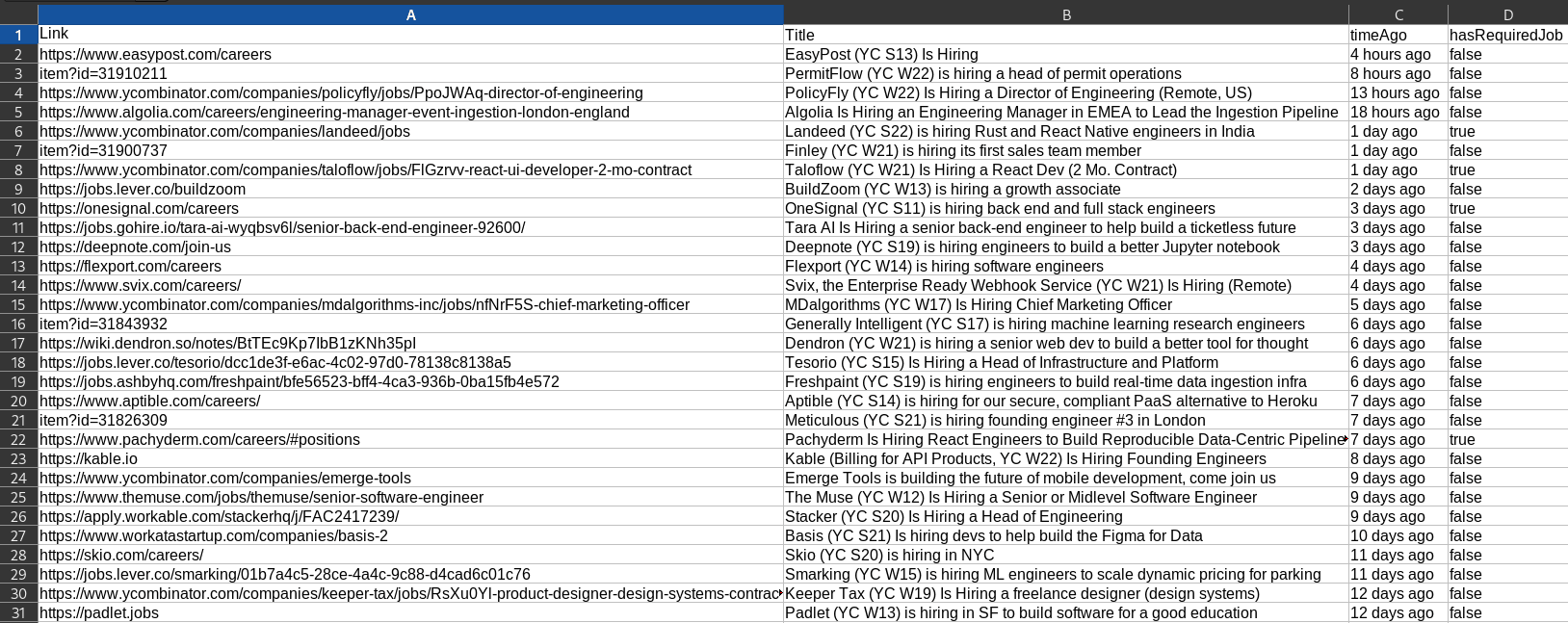
node handlerYou get a CSV file with one row per recent story.

Cheerio selectors and methods reference
Most scraping comes down to a handful of Cheerio methods. Cheerio uses a subset of the jQuery API, so the same CSS selectors you use in the browser work here.
cheerio.load(html)parses an HTML string and returns the$function.$('.classname')/$('#id')/$('div > a')select elements with CSS selectors..find(selector)searches inside the current element for descendants..text()returns the combined text content..html()returns the inner HTML..attr('href')reads an attribute. Pass a second argument to set it..each((i, el) => {})loops over every matched element..map((i, el) => {}).get()collects values into an array..first()and.last()narrow a set to one element..next()and.prev()move to sibling elements..parent()and.children()move up and down the tree..closest(selector)walks up to the nearest matching ancestor..css('color')reads an inline style value.
A quick example combining a few of them:
const cheerio = require('cheerio')const $ = cheerio.load('<ul><li class="a">one</li><li>two</li></ul>')
$('li').first().text() // "one"$('.a').text() // "one"$('li').map((i, el) => $(el).text()).get() // ["one", "two"]
Getting a 403 (or empty results)? set request headers
If Axios throws a 403, or you get HTML back but your selectors return nothing, the site is most likely blocking or fingerprinting the request. A bare Axios call advertises itself as a script, and many sites reject that. The first fix is to send headers that look like a real browser:
const response = await axios.get(url, { headers: { 'User-Agent': 'Mozilla/5.0 (Windows NT 10.0; Win64; x64) AppleWebKit/537.36 (KHTML, like Gecko) Chrome/126.0 Safari/537.36', Accept: 'text/html,application/xhtml+xml,application/xml;q=0.9,*/*;q=0.8', 'Accept-Language': 'en-US,en;q=0.9', }, timeout: 10000,})A realistic User-Agent clears most basic blocks. If it still fails:
- Slow down. Add a delay between pages so you are not hammering the server. Rapid-fire requests are an easy thing to rate limit.
- Keep cookies and a session. Some sites set a cookie on the first visit and 403 anything that arrives without it.
- Check
robots.txtand the terms of service. Being able to scrape a page does not always mean you should. - If the content is rendered by JavaScript, headers will not help, because the data is not in the HTML at all. That is a job for a headless browser (see the next section).
Heavy anti-bot protection, like a Cloudflare challenge, is deliberately hard to get past with plain HTTP, and fighting it is usually a sign you should look for an official API or data feed instead.
Cheerio vs Puppeteer and other parsers
Cheerio only parses HTML. It does not run JavaScript, so if a page builds its content in the browser, Cheerio will see an empty shell. For those pages you need a headless browser. See Cheerio vs Puppeteer: which to use for scraping for the full comparison.
If you want something even lighter than Cheerio for simple, well-formed HTML, see Cheerio vs node-html-parser.
Conclusion
Web scraping is a jigsaw puzzle in reverse. You start with the whole page and pick out only the pieces you need. Axios fetches the HTML, Cheerio lets you select the data with familiar CSS selectors, and fs writes the result wherever you want. Once you are comfortable with .find, .each, .attr, and .text, most static sites are within reach.
Complete code
You can find the complete code in this repo:
Related articles
Cheerio vs node-html-parser: which HTML parser to use
Cheerio vs node-html-parser for parsing HTML in Node.js: node-html-parser is lighter and faster, Cheerio has a fuller jQuery-style API. How to choose between them.
Cheerio vs Puppeteer: which to use for scraping
Cheerio vs Puppeteer for web scraping in Node.js: Cheerio parses static HTML and is fast, Puppeteer drives a real browser and handles JavaScript-rendered pages. When to use each, and how to combine them.
Building a RAG System with MongoDB and Node.js
Build a RAG system in Node.js using MongoDB text search. A good fit when you already run MongoDB and need keyword retrieval without a separate vector database.